

Currently Empty: $0.00



In this tutorial, you will learn how to create a simple and accurate web application for calculating the user’s age using the Django framework. This application allows users to enter their birthdate and calculate their exact age based on the year, month, and day. By utilizing Django, you will work with various tools such as forms, views, and templates to easily collect data from users and perform the necessary calculations.
The project will guide you through all the steps, from setting up Django and configuring your project to creating the necessary app, designing forms and templates, implementing the age calculation logic, and finally running it on a local server. You will also learn how to use the dateutil.relativedelta library to calculate the age accurately (including years, months, and days).
This project is particularly useful for those looking to learn how to work with Django and perform simple time-based calculations. Additionally, it will teach you essential techniques for handling forms and views in Django, which are useful in many web development projects.
1. Creating a Virtual Environment
To start, create a new virtual environment for your Django project. A virtual environment helps manage project dependencies separately from your system-wide Python packages.
python -m venv venv
source venv/bin/activate  # For Linux/macOS
venv\Scripts\activate     # For Windows
2. Installing Django and Dependencies
After activating the virtual environment, install Django and other necessary libraries.
pip install django python-dateutil3. Creating the Django Project
Now that the virtual environment is ready, create the Django project.
django-admin startproject agecalculator
cd agecalculator
4. Creating the birthday App App
Inside the project, create a new app called birthday that will handle age calculation.
python manage.py startapp birthday
5. Project Settings (settings.py))
In the settings.py file of the project, add the birthday app to the INSTALLED_APPS list to make sure Django loads it.
# agecalculator/settings.py
INSTALLED_APPS = [
    'django.contrib.admin',
    'django.contrib.auth',
    'django.contrib.contenttypes',
    'django.contrib.sessions',
    'django.contrib.messages',
    'django.contrib.staticfiles',
    'birthday',  # Add the 'birthday' app here
]
6. Creating the Form (forms.py))
In the birthday app, create a forms.py file to handle the birthdate form. In this form, we ensure that the year range goes from 1900 to the current year.
# birthday/forms.py
from django import forms
from datetime import datetime

class BirthdayForm(forms.Form):
    birthdate = forms.DateField(
        widget=forms.SelectDateWidget(years=range(1900, datetime.now().year + 1)),
        label='Select your birthdate:'
    )
7. Age Calculation Logic (views.py))
In the views.py file of the birthday app, create a view called calculate_age that will handle the age calculation. We use the dateutil.relativedelta library to calculate the age accurately, including years, months, and days.
# birthday/views.py
from django.shortcuts import render
from datetime import datetime
from dateutil.relativedelta import relativedelta
from .forms import BirthdayForm

def calculate_age(request):
    age_years = None
    age_months = None
    age_days = None

    if request.method == 'POST':
        form = BirthdayForm(request.POST)
        if form.is_valid():
            birthdate = form.cleaned_data['birthdate']
            today = datetime.today().date()
            age_delta = relativedelta(today, birthdate)

            age_years = age_delta.years
            age_months = age_delta.months
            age_days = age_delta.days
    else:
        form = BirthdayForm()

    return render(request, 'birthday/calculate_age.html', {
        'form': form,
        'age_years': age_years,
        'age_months': age_months,
        'age_days': age_days
    })
8. URL Configuration (urls.py))
We need two urls.py files: one for the birthday app and one for the main project. First, create a urls.py file in the birthday app, then reference it in the main urls.py of the project.
birthday/urls.py:
# birthday/urls.py
from django.urls import path
from . import views

urlpatterns = [
    path('', views.calculate_age, name='calculate_age'),
]agecalculator/urls.py:
In the main project urls.py file, reference the urls.py file of the birthday app so that it handles the related URLs.
# agecalculator/urls.py
from django.contrib import admin
from django.urls import path, include

urlpatterns = [
    path('admin/', admin.site.urls),
    path('', include('birthday.urls')),  # Include the birthday app URLs
]
9. Creating the HTML Template (calculate_age.html))
Finally, create an HTML template to display the form and the result of the age calculation. We will use Bootstrap for styling.
<!-- birthday/templates/birthday/calculate_age.html -->
<!DOCTYPE html>
<html lang="en">
<head>
    <meta charset="UTF-8">
    <meta name="viewport" content="width=device-width, initial-scale=1.0">
    <title>Age Calculator</title>
    <!-- Link to Bootstrap CSS -->
    <link href="https://stackpath.bootstrapcdn.com/bootstrap/4.5.2/css/bootstrap.min.css" rel="stylesheet">
</head>
<body>
    <div class="container mt-5">
        <h1 class="mb-4">Calculate Your Age</h1>
        <form method="post">
            {% csrf_token %}
            <div class="form-group">
                {{ form.birthdate.label_tag }}
                {{ form.birthdate }}
            </div>
            <button type="submit" class="btn btn-primary">Calculate</button>
        </form>

        {% if age_years is not None %}
            <div class="alert alert-info mt-4" role="alert">
                Your age: {{ age_years }} years, {{ age_months }} months, and {{ age_days }} days
            </div>
        {% endif %}
    </div>
    <!-- Bootstrap JS and dependencies -->
    <script src="https://code.jquery.com/jquery-3.5.1.slim.min.js"></script>
    <script src="https://cdn.jsdelivr.net/npm/@popperjs/core@2.0.6/dist/umd/popper.min.js"></script>
    <script src="https://stackpath.bootstrapcdn.com/bootstrap/4.5.2/js/bootstrap.min.js"></script>
</body>
</html>
10. Running the Project
Once everything is set up, you can start the Django development server:
python manage.py runserverThe project will be available at http://127.0.0.1:8000/.
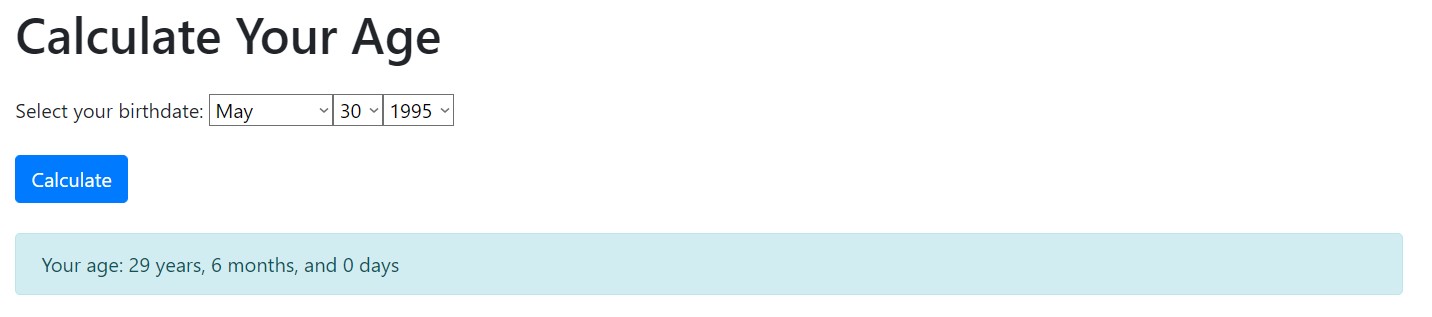
Final Outcome:
- You now have a fully functioning Django project that can calculate a person’s age based on their birthdate.
- The form correctly displays years from 1900 to the current year.
- The age is calculated with precision, including years, months, and days.
- The code structure is clean and modular, allowing for easy future expansion and maintenance.
Course Includes:
- Price:
Free
- Instructor:codewithpouria
- Duration:10 weeks
 Lessons:0
- Students:0
- Language:English
- Certifications:Yes
Courses You May Like
10 weeks
All Levels
Django Unit Conversion Project Tutorial
Free
To create a Django web application capable of converting various units, follow these steps. This project involves setting up a…
Enroll Now
10 weeks
All Levels
The Django Journey: From Beginner to Expert
Free
Embark on a transformative adventure into the world of web development with our comprehensive course, “The Django Journey: From Beginner…
Enroll Now
10 weeks
All Levels
Python For Beginners
Free
The “Python For Beginners” course is an excellent opportunity for individuals looking to familiarize themselves with the Python programming language.…
Enroll Now